2026-03-12: Security Model
Note
With release v5.2.0, SlideRule has overhauled and tighted its security model to prevent misuse of its public services.
Overview
SlideRule Earth leverages GitHub authentication and account membership status within the GitHub SlideRuleEarth organization to authorize access to SlideRule services. Credentials are provided by users using a JSON Web Token (JWT) issued by the SlideRule Earth login service (login.slideruleearth.io). A user’s JWT contains claims used and verified by SlideRule services to allow access.
Model Components
Roles
Owner - SlideRuleEarth owner with administrator access to all services
Member - SlideRuleEarth member with nominal access to all services
Collaborator - External affliate of the SlideRuleEarth team with access to designated services
Guest - Authenticated user with access to public services
Anonymous - Unauthenticated
Services
Certbot - manages SSL certificates for the service domain.
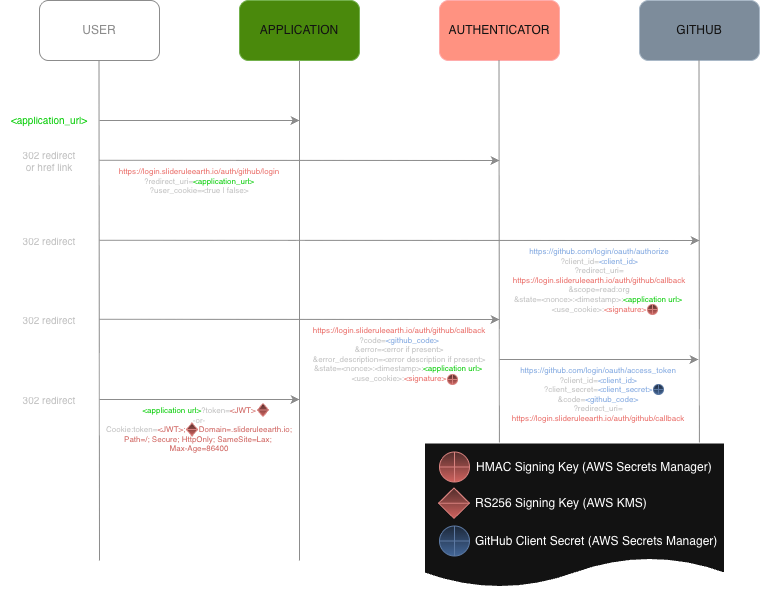
Authenticator at https://login.slideruleearth.io – delegates authentication to an external identity provider (IdP), and performs authorization based on the authenticated identity.
Provisioner at https://provisioner.slideruleearth.io – manages cluster lifecycle operations, including deployment, status, and tear-down
Cluster at https://{cluster}.slideruleearth.io - provides low-latency science data processing (the primary application under the SlideRuleEarth project)
Runner at https://runner.slideruleearth.io – provides batch job processing orchestration and status
Requests
Unauthenticated Requests - No credentials are supplied in the HTTP request
Authenticated Requests - Bearer token provided in authorization header of HTTP request
Users must use one of the authorization flows provided at
login.slideruleearth.ioto obtain a JWTThe JWT must be provided as a bearer token in each request to a SlideRule service:
Authorization: Bearer <JWT>
Signed Requests - EdDSA signature provided in custom SlideRule header of HTTP request
Users must create an Ed25519 public/private key pair and store in a well-known file in their home directory:
ssh-keygen -t ed25519 -f .sliderule_key.The public key
.sliderule_key.pubmust be provided to the SlideRuleEarth development teamEach request must be signed using the
.sliderule_keyprivate key.The
signatureis calculated over the canonical message{path_b64}:{timestamp}:{body_b64}wherepath_b64is the base64 encoded string of the full path to the endpoint including the hostname of the service (e.g. provisioner.slideruleearth.io/info),timestampis the unix system time expressed as seconds since epoch rounded to the nearest integer, andbody_64is the base64 encoded string of the body of the request.The ASCII encoded string of the
timestampis provided in thex-sliderule-timestamp: {timestamp_str}header, and the base64 encoded string of thesignatureis provided in thex-sliderule-signature: {signature_b64}header.
Permissions
sliderule:access - nominal access to cluster services
sliderule:admin - administrative access to cluster services
provisioner:access - access to provisioner services
runner:access - access to runner services
mcp:tools - access to mcp server
mcp:resources - access to mcp server
monitor:access - access to cluster monitor
Security Rules
Expirations
At different stages of the authorization flows there are time limits imposed to reduce the risk of compromised credentials.
| Element | Time Limit | Notes |
|---|---|---|
| SlideRule JWT | 12 hours | |
| OAuth2.1 Web Authorization Session | 12 hours | Once a client is dynamically registered it must complete all authorization requests within this time |
| OAuth2.1 Web Authorization Code | 2 minutes | Once a client receives an authorization code it has this long to exchange it for a token; after its first use the code is no longer valid |
| GitHub HTTP Requests | 15 seconds | All requests to GitHub APIs must complete promptly |
| GitHub Authentication Session | 1 minute | Once the SlideRule server initiates the authentication flow with GitHub it has this long to complete the authentication |
| Signed Request | 1 minute | All signatures on signed requests must be timestamped within this amount of time (+/-) of the signature verification |
Cluster Access
Members of the SlideRuleEarth organization have permission to deploy, access, and destroy private clusters namespaced to the organization teams they belong to. Owners within the organization can deploy, access, and destroy any cluster with a valid namespace (obeying url rules and AWS cloud formation stack name restrictions). Both members and owners are restricted to node capacity and time-to-live constraints imposed by the the provisioner.
| Role | Max Node Capacity | Max TTL |
|---|---|---|
| Owner | 100 | 1 year |
| Member | 50 | 12 hours |
Web Client Restrictions
When logging into SlideRule using the SlideRule Web Client, the client restricts the user permission set to sliderule:access, and provisioner:access. This prevents a leaked token from being used for administrator access or for access to any of the other services
Third Party Redirects
When a third party application is granted access to SlideRule services, a reduced set of permissions are enforced. Any authorization attempt that requests permissions not in the reduced set will be rejected. Currently, the only allowed permissions for third party applications are: mcp:tools, mcp:resources.
MCP Exclusivity
When MCP resources are requested (either via the scope or resource field of the authorization request), all permissions that would have been granted in the JWT are dropped and only the mcp:tools and mcp:resources permissions are provided. This is to limit third party agents from broad access to SlideRule resources.
Request Signing
The following services require request signing:
All requests to the Provisioner when the user provides a JWT that identifies them as an Owner.
All requests to the Runer regardless of the role of the user.
Requests to the Cluster (public or private) that route to the Arbitrary Code Execution (
ace) and Container Runtime Environment Execution (execre) endpoints.
Flow Diagrams
Basic Web Flow (OAuth 2.0 Authorization Code)